

Charging the batteries
Download as PDFThe Consibio Logger runs on two rechargeable batteries. You can charge them with the dedicated battery charger, or leave them in the Logger and power it over USB-C.
Required equipment
Section titled “Required equipment”- The batteries from the Consibio Logger
- The Consibio battery charger
1. Connect
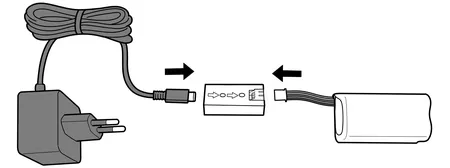
Section titled “1. Connect”Connect the batteries to the charger, and connect the charger to power.
2. Charge
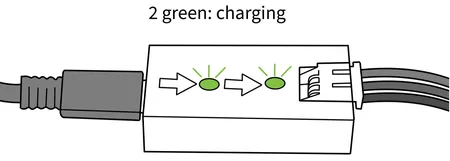
Section titled “2. Charge”The batteries now charge. While charging, the charger shows two green LEDs.
3. Done
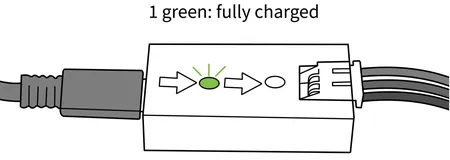
Section titled “3. Done”When only one green LED remains lit, the batteries are fully charged and ready to use.
Charging the batteries in the Logger
Section titled “Charging the batteries in the Logger”You don’t have to remove the batteries to charge them. If you connect a USB-C power supply to the Logger while the batteries are installed, the Logger charges both batteries in place. This is convenient when the Logger is already mounted and you just need to top up the batteries.
If you have any questions, reach out to us at support@consibio.com.