

Troubleshooting inaccurate flow readings
Download as PDFOn a level-based flow installation, Consibio does not measure flow directly. The flow is calculated from the water level the radar measures and the geometry of the pipe:
- A, Installation height — the distance from the bottom of the level sensor to the bottom of the invert.
- D, Pipe diameter.
- S, Pipe slope.
Because the flow is derived from these values, if any one of them is off, the calculated flow is off too. When a reading looks wrong, the fastest way to find the cause is to work back through the chain: first check the water level, then the installation height, then the slope.
If you have the Advanced Flow solution, a surface-velocity radar also feeds into the calculation — see Calibrating velocity measurements for that setup. This article covers the level-and-slope flow calculation.
Signs a flow reading may be inaccurate
Section titled “Signs a flow reading may be inaccurate”- The reported flow does not match a quick hand calculation or a visual check of the pipe network — for example, a manhole that reads a steady ~6000 gpm that the pipe clearly can’t be carrying.
- The flow is suspiciously flat or steady when you’d expect it to rise and fall over the day.
- The flow is consistently a round multiple (roughly 2×, ½×, …) of what you expect, which often points to a single wrong input rather than a real change.
Local flow conditions such as turbulence, waves or foam at the sensor can also disturb the radar’s level reading, so start by confirming the level is correct.
1. Measure the water level manually
Section titled “1. Measure the water level manually”Take a manual measurement of the water level on site — for example with a dip rod lowered to the bottom of the invert. Note both the value and the exact time of the measurement, because you’ll compare it against the reading stored at that same moment.
2. Compare it against the level in the dashboard
Section titled “2. Compare it against the level in the dashboard”Open the project in Consibio Cloud at v3.consibio.cloud and open the widget or element that shows the water level. Hover the point at the time you noted down and read off the stored value:
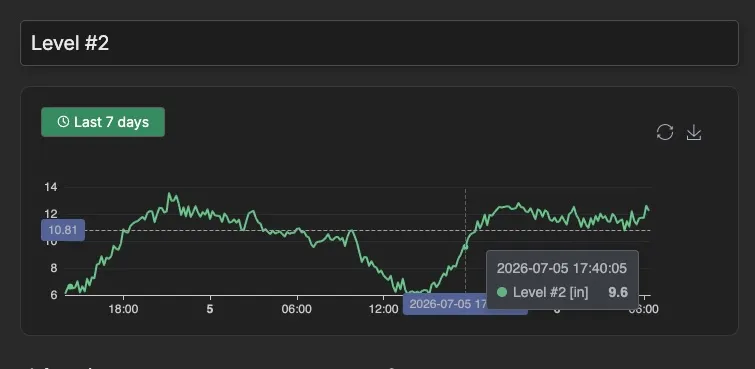
Compare this stored value with your manual measurement:
- If the two match, the level is good — the error is elsewhere, so continue to step 4.
- If they don’t match, the installation height is likely wrong — continue to step 3.
3. If the level is wrong, correct the installation height
Section titled “3. If the level is wrong, correct the installation height”If the stored level doesn’t match your manual measurement, adjust the installation height (A) in the flow calculation setup — the distance from the bottom of the level sensor to the bottom of the invert. A wrong installation height is the most common cause of an inaccurate level, because it sets the reference the radar distance is subtracted from.
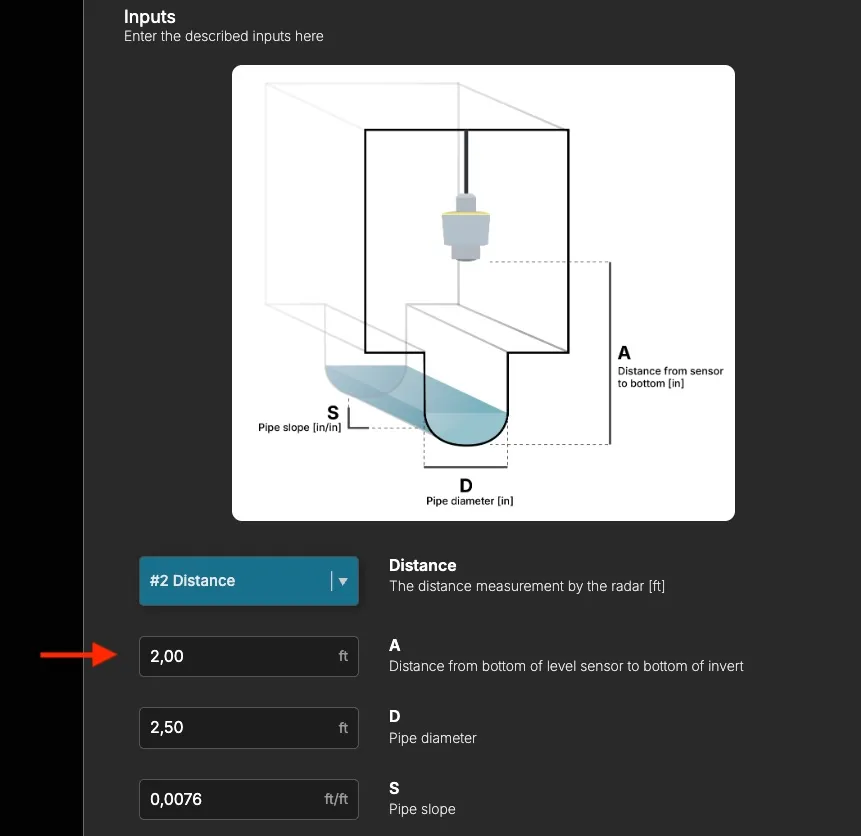
Set A so that the calculated level matches your manual measurement, then re-check the level in the dashboard. For how to derive an accurate installation height, see Installing the Level & Flow solution for Logger WD-68.
4. If the level is correct, adjust the pipe slope
Section titled “4. If the level is correct, adjust the pipe slope”If the level matches but the flow is still wrong, the pipe slope (S) is the next input to check, since flow scales with the slope. Look up the slope in the pipeline documentation for the manhole and enter it, or adjust it to bring the flow into line — if the flow reads about twice what it should, halve the slope; if it reads about half, double it.
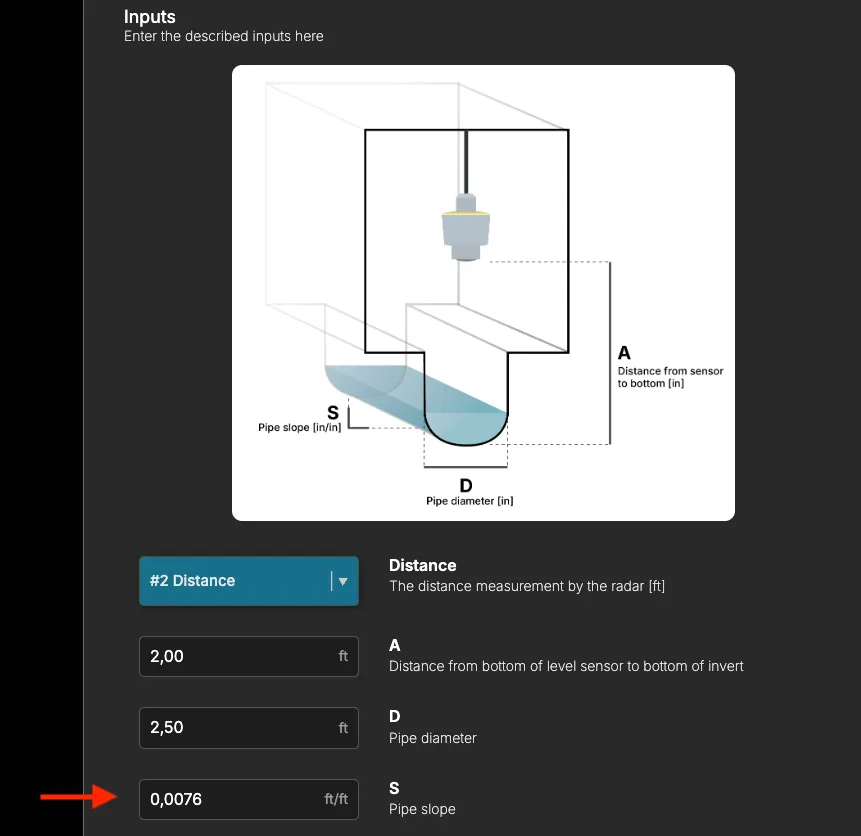
Also confirm the pipe diameter (D) matches the pipe on site — a wrong diameter shifts the flow as well.
Troubleshooting
Section titled “Troubleshooting”- The level is right but the flow still looks off — re-check the pipe slope (S) and diameter (D) against the pipeline documentation.
- The level jumps around or won’t settle — turbulence, waves or foam at the surface can disturb the radar. Check the sensor is mounted over calm water and aimed straight down at the surface.
- You’re not sure which input is wrong — send us the manual water level and the time you measured it, and we’ll help work back through the calculation.
If the reading still doesn’t look right after checking the level, installation height, slope and diameter, reach out to support@consibio.com.